Local Meeting Transcription
Drop a Zoom recording in. Get a timestamped, speaker-labeled transcript out. Everything runs locally — no audio leaves your machine.
A local government office needed transcripts of their weekly council meetings. The recordings were Zoom files — sometimes over an hour long, multiple speakers, cross-talk, varying audio quality. They needed to know who said what and when.
Cloud transcription services could handle it, but the content included sensitive municipal discussions — budget decisions, personnel matters, legal deliberations. Uploading that audio to a third-party server wasn't acceptable. They needed a solution that ran entirely on their own hardware.
I built a single-command pipeline that takes any audio or video file and produces a complete, speaker-labeled transcript as both plaintext and formatted PDF. The entire process runs locally on a GPU-equipped server with no internet connection required.
The pipeline runs in five stages: audio extraction from the source file, speech-to-text transcription using NVIDIA's Parakeet model through NeMo, speaker diarization using pyannote.audio to identify who's talking when, alignment of the transcript text with speaker labels, and formatted output generation with timestamps and speaker names.
Long recordings are automatically chunked into segments with overlap to stay within GPU memory limits — the system handles multi-hour meetings on a 12GB card without running out of memory. Speaker names can be mapped through a simple config file so the output reads "Mayor Smith" instead of "Speaker 01."
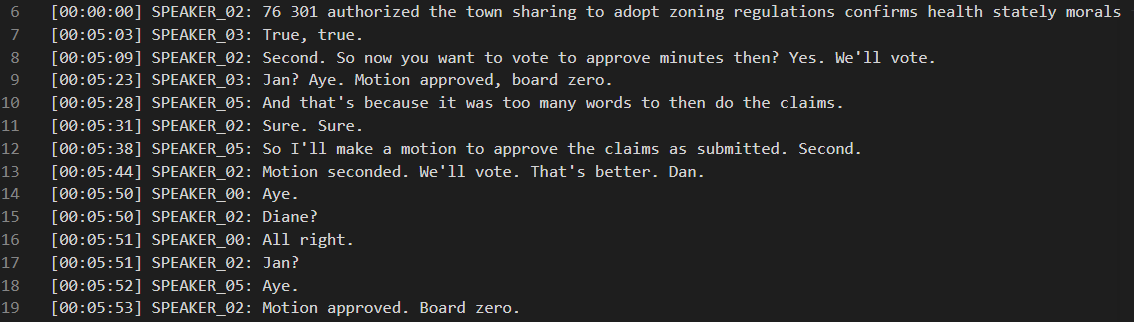
Timestamped, speaker-labeled transcript — motions, votes, and discussion automatically attributed to individual speakers.
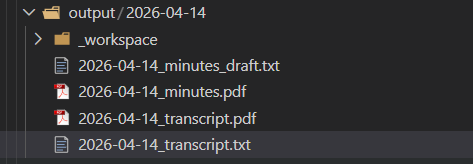
Organized output — date-stamped directory with transcript files and formatted PDFs ready to file or distribute.
Fully Local Processing — Every model runs on local hardware. No audio is uploaded anywhere. No API keys needed. No subscription costs. Once installed, it runs indefinitely with no ongoing expenses.
Automatic Speaker Identification — The system identifies individual speakers and labels every line of the transcript with who said it. It handles cross-talk, interruptions, and varying numbers of participants without manual configuration.
Long Recording Support — Recordings of any length are handled automatically. The system chunks long audio into overlapping segments, transcribes each one, and stitches the results together seamlessly. Multi-hour recordings work on modest hardware.
Multiple Input Formats — Accepts MP4, M4A, MP3, WAV, MKV, MOV, AAC, FLAC, and OGG. Zoom recordings work directly without conversion.
Formatted Output — Produces both plaintext and PDF transcripts with timestamps, speaker labels, and clean formatting. Ready to file, share, or use as input for further processing.
Batch Processing — Drop multiple recordings into the input folder and the system processes them all sequentially. Already-processed files are skipped automatically.
Speaker Name Mapping — A simple JSON config maps generic speaker labels to real names. Set it once for recurring meetings and every future transcript uses the correct names.
Drop-In Architecture — No daemon, no service, no persistent state. The tool runs when called and exits when done. Designed to be invoked by other systems — an AI assistant, a cron job, a wrapper script — so it fits into existing workflows rather than requiring everything to revolve around it.
This tool was built for a specific client and is in active use. It processes weekly meeting recordings on local hardware with no cloud dependency and no ongoing subscription costs. The output serves as the basis for official records.
A 2.5-hour recording produces a complete speaker-labeled transcript in roughly 10-15 minutes of processing time on a single 12GB GPU.
Built from scratch in Python to solve a specific real-world problem for a real client. No wrapper around an existing product — a custom pipeline designed around the actual workflow and privacy requirements of the use case.
If your organization records meetings, interviews, hearings, or any other audio that needs transcription — and you can't or don't want to send that audio to a cloud service — this is the kind of tool I build. The transcription pipeline is adaptable to different formats, different output templates, and different hardware configurations.
It's also an example of how I approach projects generally: understand the actual workflow, identify the real constraints (in this case, privacy and cost), and build a tool that fits the problem rather than forcing the problem to fit an existing product.